C++ Code Intel Simplify Copilot CLI Setup
You are hacking away in the terminal, relying on Copilot CLI to speed up your workflow, but your terminal lacks the deep semantic understanding of a full-fledged IDE. For C++ developers, bridging this gap has historically meant wrestling with manual environment configurations and compilation databases. We've been watching this closely, and Microsoft just dropped an update that fixes this exact pain point. By streamlining how Copilot interacts with your build system, command-line code intelligence is becoming significantly easier to deploy.
News Summary
Microsoft has launched a streamlined setup process for its C++ language server plugin within the Copilot CLI ecosystem. The update introduces an automated Language Server Protocol (LSP) setup skill designed to generate and refresh compile databases automatically. This tackles the traditional friction of configuring a compile_commands.json file, which the language server uses to parse compiler contexts and understand source structures.
The new plugin targets common build environments out of the box. For CMake users, the skill leverages native compilation hooks or helps configure the repository initialization directly. MSBuild developers receive a guided onboarding experience or can link out to a sample utility to export their compilation databases.
For custom, hermetic, or vendored build pipelines where standard discovery fails, Microsoft now supports project-specific skills. Teams can package their unique environment setups once, making the configuration repeatable across the entire engineering organization. The server operates natively across Windows, Linux, and macOS platforms. It actively monitors the compile_commands.json file, automatically pushing updates to the language server the moment your build target changes.
Developer Impact
What this means for developers is that you no longer have to sacrifice IDE-level precision when working entirely inside a terminal session. If you are maintaining large-scale C++ microservices or working on cross-platform desktop applications, your AI pair programmer now understands your exact compiler flags, macro definitions, and header include paths.
This translates to more accurate code generation, precise diagnostics, and contextual code explanations without leaving your shell session. If you run complex build configurations that require custom toolchains, the ability to script a repeatable onboarding skill means you can standardize AI tooling setups across your entire developer team instantly.
Our Analysis
This is a highly beneficial upgrade for the command-line development ecosystem. Historically, AI code assistants in the terminal functioned primarily as glorified regex parsers or basic LLM wrappers that lacked true situational awareness of a project’s dependency tree. By anchoring Copilot CLI to the compiler’s actual build database via LSP, Microsoft is turning the terminal into a robust, context-aware engineering environment.
We predict that this moves the industry closer to a unified toolchain model where local developer tools and cloud-hosted LLMs share a synchronized semantic map of a repository. Instead of relying on massive context windows to guess how your project links together, the AI relies on small, structured compilation data blocks.
Compared to previous preview versions of C++ Copilot integrations, which required devs to manually generate, format, and maintain their compilation paths, this release automates the heavy lifting. It directly matches the ease of use found in modern web development frameworks, bringing a much-needed modernization wave to systems-level programming languages.
| Build System Type | Previous Setup Overhead | New Plugin Configuration Path |
| CMake | Manual flag passing (<code>-DCMAKE_EXPORT_COMPILE_COMMANDS=TRUE</code>) | Automated onboarding via automated LSP setup skill |
| MSBuild | Complex external scripting required to dump compilation info | Guided skill onboarding or sample utility translation |
| Custom Toolchains | Manual generation of <code>compile_commands.json</code> per environment | Repeatable project-specific skill deployment |
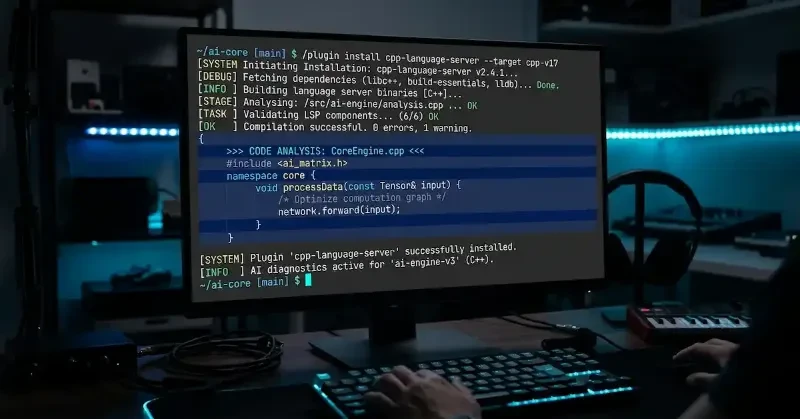
To install the language server and initialize your project configuration database directly from the terminal, run the following sequence:
# Install the Microsoft C++ language server plugin from the marketplace
/plugin install cpp-language-server@copilot-plugins

# Trigger the LSP skill to discover your build system and build the index
# Note: You can also use "load project" depending on your workspace target
/copilot-cli regenerate compile commands
FAQs
Q: Do I need a specific operating system to run this new C++ language server skill? A: No. The Microsoft C++ language server runs natively across Windows, Linux, and macOS environments, provided you have an active GitHub Copilot subscription.
Q: What happens if I modify my source files or add new headers to my CMake project?
A: The LSP server automatically monitors your compile_commands.json file for structural changes. If your underlying build targets alter radically, you can re-invoke the "regenerate compile commands" skill to sync the language server.
Q: Can I use this if my team relies on a proprietary or vendored compiler toolchain? A: Yes. For custom pipelines, you can create a project-specific skill that maps your repository's custom build wrapper, allowing Copilot to fetch the correct data reliably.
Our Take
Microsoft's integration of build-aware LSP skills into Copilot CLI removes a major barrier for terminal-bound C++ engineers. By treating build environments as dynamic data sources rather than manual configuration hurdles, they are making advanced AI tools practical for complex systems codebases. We will be keeping a close eye on how this system-level context integration expands to other compiled languages down the road.