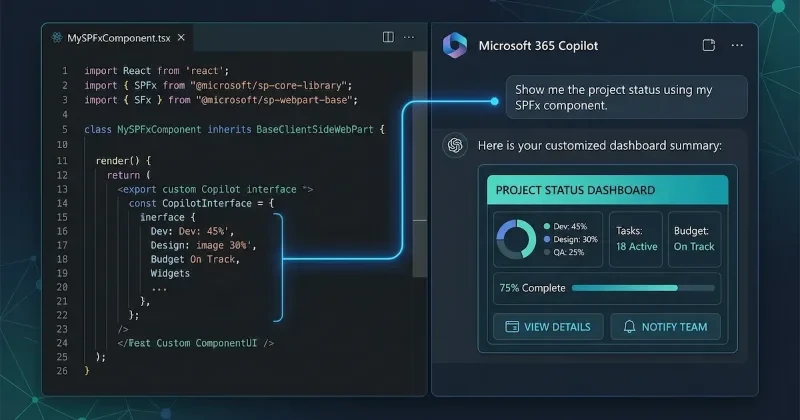
SPFx Roadmap Microsoft Debuts SharePoint Copilot Apps
If you have ever been tasked with building a custom intranet solution or maintaining enterprise business workflows within the Microsoft ecosystem, you know that the SharePoint Framework (SPFx) is the quiet workhorse of corporate extensibility. We have been watching the convergence of enterprise data and LLMs closely, waiting for the moment Microsoft fully lowered the barrier for custom internal tools. That moment arrived with the June 2026 roadmap update. Microsoft is formally steering its massive third-party developer base toward an AI-first surface, turning standard UI web parts into intelligent canvas extensions.
News Summary
Microsoft has officially announced SharePoint Copilot Apps, a new structural evolution for the SharePoint Framework designed to embed developer-built features directly onto the Microsoft 365 Copilot canvas. This update establishes a direct path for developers to surface custom data, contextual actions, and automated business workflows into standard Copilot interactions. The primary appeal for engineering teams is skill reuse; instead of learning a decoupled framework, you can leverage your existing SPFx tooling, pipelines, and React skills to ship AI-driven experiences.
The rollout timeline is tight. A public preview of SharePoint Copilot Apps launches under the SPFx 1.24 branch in July 2026, with a target for General Availability (GA) slated for September 2026.
Alongside this forward-looking milestone, Microsoft shipped SPFx 1.23.2, a dedicated quality and hygiene release. This minor version focuses on resolving enterprise-scale stability bugs and patching vulnerabilities surfacing in npm audit. Crucially, version 1.23.2 introduces server-side preparation for the upcoming new and edit panel override capability for lists and libraries. This foundation ensures that when the layout customization tools go live in July, the underlying platform remains completely stable.
Developer Impact
If you are managing enterprise SaaS platforms or building custom workflows within Teams, Viva, or SharePoint, this framework shift changes how you expose application data. Instead of forcing users to navigate to a dedicated dashboard or custom list view to manipulate business data, you can build SPFx components that inject UI directly into the Copilot chat window.
The immediate benefit is the elimination of auth and data ingestion friction. Because these apps run on the established SPFx runtime, they natively integrate with Microsoft Graph and inherit the compliance and permission boundaries already set up for your organization. If you are shipping internal line-of-business tools, your deployment pipeline remains almost identical, but your application delivery vehicle shifts from a static page web part to an interactive agent surface.
Our Analysis
Our stance on this update is highly positive for enterprise developers, though it comes with caveats regarding technical debt. For years, writing software for the Microsoft 365 ecosystem felt isolated from the broader, fast-moving web development world. By tying Copilot agent UX directly to SPFx, Microsoft avoids fracturing its ecosystem and rewards developers who stuck with their ecosystem stack.
We predict this will trigger a rapid surge in internal enterprise AI tooling over the next two quarters. Because companies are hesitant to ship proprietary data over external LLM APIs, the ability to build secure, context-aware agents on top of existing SharePoint infrastructure solves a massive security headache.
However, Microsoft is still playing catch-up regarding developer ergonomics. The fact that standard out-of-the-box web parts are still being upgraded to fully support React 18 is a stark reminder of how slowly the enterprise ship turns. While individual developers can build custom components using modern React 18 paradigms today, official core support will not fully land until the 1.24 GA release in September.
Compared to building standalone bots via Copilot Studio, utilizing SPFx gives engineers granular control over the presentation layer. You are not stuck with generic text responses; you can pass rich code blocks, interactive forms, and custom data visualizations directly into an active conversation.
| Feature / Milestone | SPFx 1.23.2 (June 2026) | SPFx 1.24 Preview / GA (Q3 2026) |
| Primary Focus | Security hygiene & platform stabilization | AI integration & layout flexibility |
| Copilot Extensibility | Groundwork & underlying plumbing | Full SharePoint Copilot Apps support |
| UI Customization | Readiness for list panel overrides | Navigation customizers & panel overrides |
| Core React Version | React 18 restricted to custom parts | Full out-of-the-box React 18 support |
| Tooling Options | Early preview of open-source CLI | Production-ready SPFx CLI GA |
When creating components for SharePoint Copilot Apps, your properties hook deeply into semantic search context. Here is a minimal structural view of how an SPFx property pane passes custom contextual actions down to an agent card:
import { BaseClientSideWebPart } from '@microsoft/sp-webpart-base';
import { IPropertyPaneConfiguration, PropertyPaneTextField } from '@microsoft/sp-property-pane';

export interface ICopilotAgentPartProps {
  agentContextQuery: string;
  actionEndpoint: string;
}

export default class CopilotAgentWebPart extends BaseClientSideWebPart<ICopilotAgentPartProps> {

  public render(): void {
    // Escaped contextual rendering inside the Copilot canvas surface
    this.domElement.innerHTML = `
      <div style="padding: 10px; border-left: 4px solid #0078d4;">
        <h4>Agent Component: Ready</h4>
        <p>Query Context: <strong>${this.properties.agentContextQuery || 'Awaiting input...'}</strong></p>
        <button id="triggerActionBtn">Execute App Action</button>
      </div>
    `;

    this.domElement.querySelector('#triggerActionBtn')?.addEventListener('click', () => {
      this._handleContextAction();
    });
  }

  private _handleContextAction(): void {
    // Fire off internal enterprise graph actions using the native SPFx context
    console.log(`Action triggered for endpoint: ${this.properties.actionEndpoint}`);
  }

  protected getPropertyPaneConfiguration(): IPropertyPaneConfiguration {
    return {
      pages: [
        {
          header: { description: "Configure Copilot Canvas Parameters" },
          groups: [
            {
              groupName: "Agent Settings",
              groupFields: [
                PropertyPaneTextField('agentContextQuery', {
                  label: "Semantic Hook Keyword"
                }),
                PropertyPaneTextField('actionEndpoint', {
                  label: "API Routing Destination URL"
                })
              ]
            }
          ]
        }
      ]
    };
  }
}
FAQs
Q: Can I use my existing SPFx web parts inside SharePoint Copilot Apps?
A: Yes. The new app model is explicitly built to let developers reuse their current code configurations, assets, and deployment methods, reducing the need to write brand-new logic from scratch.
Q: When can we actually deploy SharePoint Copilot Apps to production tenants?
A: Production rollout is targeted for September 2026 alongside the General Availability of SPFx version 1.24, following the public preview period starting in July.
Q: Will the name "SharePoint Copilot Apps" change in the future?
A: Microsoft has specified that this is the working title for the public preview phase, meaning the product marketing name could shift by the time it reaches general availability.
Q: Does SPFx 1.23.2 force an entire project migration if I am running a stable 1.23 build?
A: No, it is a point-release focused primarily on underlying stability, npm dependency security patches, and server-side preparations for upcoming layout features.
Our Take
Microsoft is making a smart, pragmatic play by anchoring Copilot agent UI directly into the SharePoint Framework. Instead of introducing a complex new SDK, they are giving enterprise web developers immediate utility for the code patterns they already understand inside out. If you build for corporate networks, getting your hands on the July 1.24 preview should be your team's immediate priority. We will be tracking the preview build closely as the official documentation drops, so keep your development environments ready.